Contractor Estimate App for Kansas City: Estimates, Approvals and Deposits Over WhatsApp

By Rina Córdoba
Worked in sales and customer service at a software company in Bogotá. Lives in Kansas City.
Tu Negocio Listo is a Spanish-first estimate app for contractors in Kansas City. You build the estimate on your phone, send it from your own WhatsApp, and the customer approves with one tap. You collect the deposit before buying materials and the balance when you finish, by card, Zelle or cash. Rina sets it up with you in person.
Free, 30 minutes, no commitment.
We're a new Kansas City company taking on our first clients.
How do I look professional next to bigger companies?
With a clean estimate, your business name on it and every line item priced, that the homeowner opens on their phone and approves with one tap. That carries more weight than a voice note or a photo of a handwritten page.
When the customer is comparing bids, the contractor who sends a clear estimate the same day they came out to measure earns more trust, even if the competition has more trucks. And if your customer speaks English, you send it in English even if you work in Spanish: you pick the customer's language when you build it.
How do I get the deposit before buying materials?
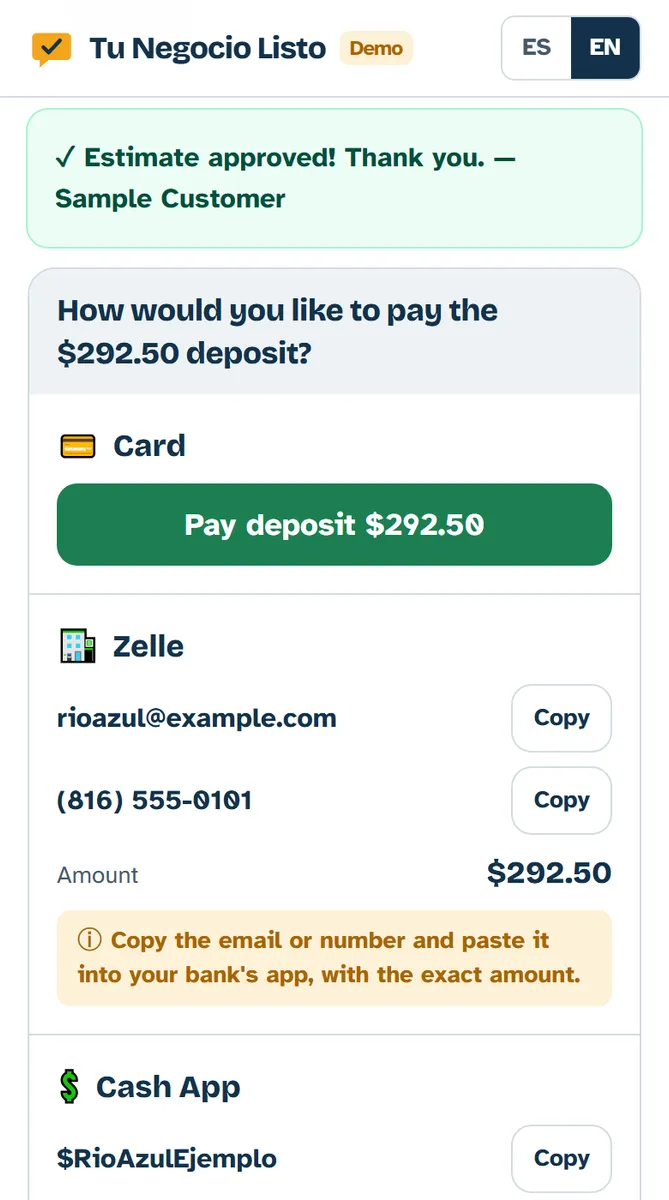
When you build the estimate you choose the deposit percentage, and the customer pays it as soon as they approve: by card through a link, or by Zelle, Cash App, Venmo or cash. You don't buy lumber, concrete or hardware until you see that deposit marked as paid.
If they pay by Zelle, check your bank to make sure the money arrived, then mark it as paid. What each customer paid, and when, is written down on the estimate, not on a scrap of paper in the glovebox.
Can I get paid in stages, deposit first and the balance later?
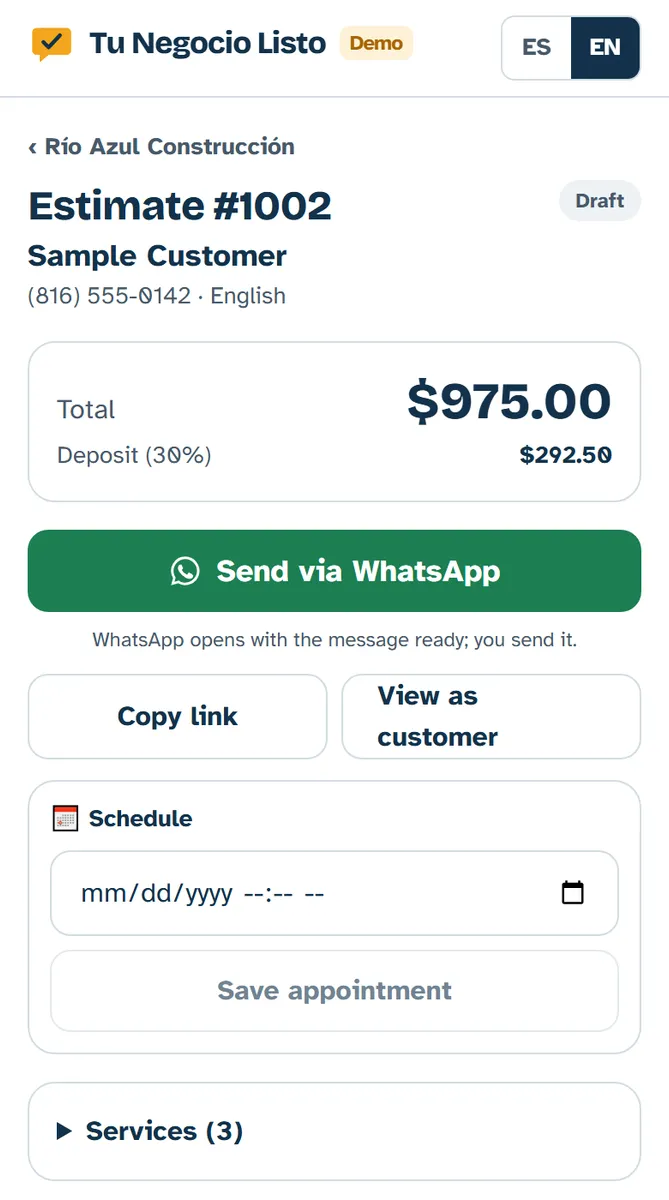
Yes. The deposit is collected when the customer approves and, when the job is done, you send them the balance payment link on WhatsApp. WhatsApp opens with the message ready, including the amount left, and you tap send.
Each estimate shows what's been paid and what's still owed. If it's a long project and you want to collect a middle stage, make a separate estimate for that stage and send it when the time comes.
What do I do when the customer wants something different once the job has started?
Put it in writing on a new estimate for that same customer, with the price of the change, and don't start that part until they approve it with one tap. For example: "Change: railing on the deck" or "Change: two more steps."
That avoids the usual argument at the end of the job, when the customer no longer remembers asking for something extra. The approval is recorded with the date and the name of the person who approved.
How do I offer two options, for example pressure-treated wood or composite?
Build two estimates for the same customer, one per option, and let them pick which one to approve. Each has its own line items, total and deposit.
Explain the difference in the notes in plain words: pressure-treated wood costs less up front but needs sealing and upkeep; composite costs more, but it doesn't splinter and never needs painting. The homeowner compares at their own pace, without you repeating the numbers over the phone.
Where do job notes and customer history live?
Each estimate keeps its notes, line items, payments and history: when you sent it, when the customer opened it, when they approved and when they paid.
Use the notes for what you don't want to forget about the job: measurements, the stain color the customer picked, where the truck can get in, whether the permit is already filed. When that customer calls you again next summer, it's all there.
How do I price by the square foot without coming up short?
Measure length times width, add a margin for waste and cuts, and list separately whatever doesn't depend on size: stairs, railings, the permit and debris haul-off.
On a deck, posts, beams, fasteners and hardware hide easily inside the per-square-foot price; make sure your number covers them. On concrete, think about the gravel base, rebar or mesh, forms and the finish (broom, stamped or smooth). If the ground slopes or an old patio has to come out, make it its own line item.
When everything has its own line, the customer understands why it costs what it costs, and you can drop or add items while you build the estimate without redoing the math by hand.
What does a deck and patio estimate look like?
Every line with its quantity and price, the total, the deposit and what's left to pay.
For example, with the demo's sample prices: a 200 sq ft pressure-treated deck at $35 per sq ft, $7,000; a 150 sq ft concrete patio at $12 per sq ft, $1,800; a city permit, $350; and debris haul-off with a dumpster, $450. Total: $9,600. With a 30% deposit, the customer pays $2,880 on approval and $6,720 at the end.
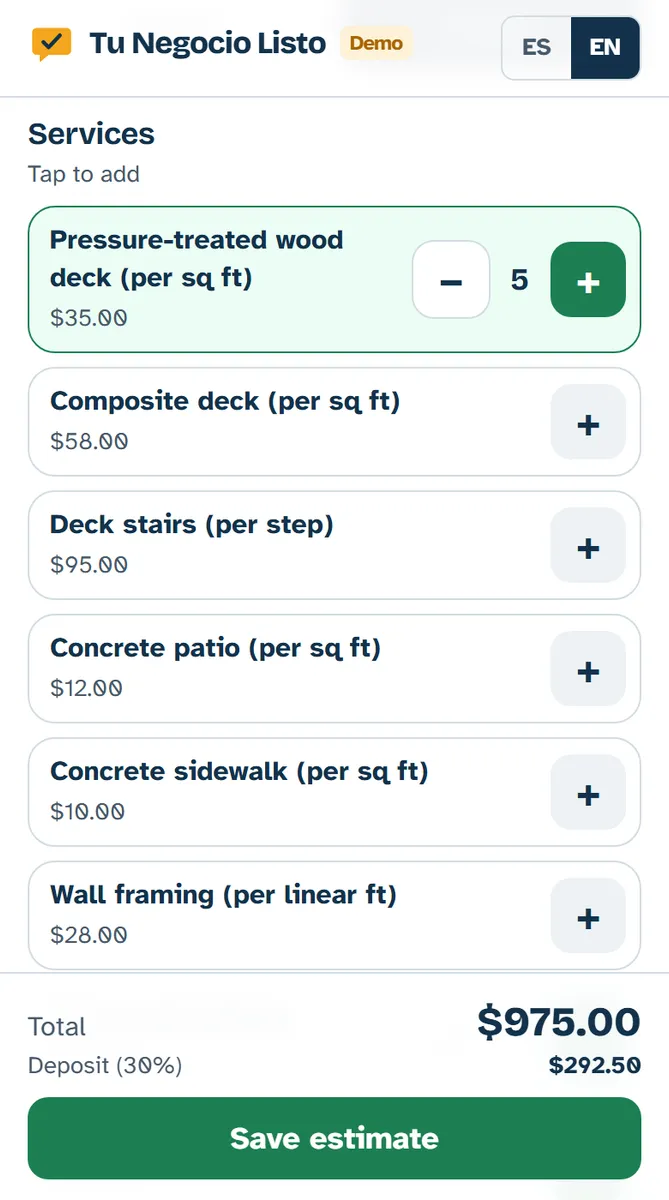
You set your own prices. When we set up your system we load your most common line items, per square foot, per linear foot or per job, and you add them with one tap.
How does it look on a phone?
Screenshots from the demo with Río Azul, a made-up construction company: building the estimate, sending it, and the deposit the homeowner sees.
Who is it for, and who isn't it for?
Better to know now, before the call.
Is it for you?
- You're a contractor who does the work yourself, alone or with a small crew.
- You talk to customers on WhatsApp and would rather work in Spanish.
- You get paid by Zelle, cash, Cash App or card, and want the deposit before you buy materials.
When isn't it for you?
- You run a large company and need payroll, GPS crew tracking or full accounting.
- You already use an app that works well for you and don't want to switch.
How does it compare with a notebook or the big apps?
Each option is good for something different. This table is general and isn't about any specific app.
| Topic | Notebook + WhatsApp | Big apps in English | Tu Negocio Listo |
|---|---|---|---|
| Who sets it up? | You | You, with online help | We do, with you, in Spanish, in person |
| Language | Whatever you write | Mostly English | Spanish first, English too |
| Estimates with one-tap approval | No | Yes | Yes |
| Deposits and payments | By hand | Card | Card, Zelle, Cash App, Venmo or cash, all recorded |
| In-person help in Kansas City | No | No | Yes, with Rina |
The big apps have more features for large teams. If they already work for you, stick with them.
How much does it cost?
Your price depends on what your business needs.
Your system up and running in 7 days, once we have your information.
From$149/month
Your monthly fee includes
- Your system running on your phone and your computer
- Support in Spanish on WhatsApp
- Two small changes a month
- Backups and updates
Prices in US dollars. Your customers pay through Stripe or Square and the money goes straight to your account; we never touch it.
Free, 30 minutes, no commitment.
Have more questions?
Is it a WhatsApp app?
No. Tu Negocio Listo is a separate system that you open on your phone or computer. You send estimates and payment links from your own WhatsApp: WhatsApp opens with the message ready and you tap send.
Can my customers pay by Zelle or cash?
Yes. They can pay the deposit and the balance by card through a link, or by Zelle, Cash App, Venmo or cash. You mark those payments as paid when they arrive, and they're recorded on the estimate.
How long does setup take?
Your system is up and running in 7 days, once we have your information: your line items, your prices and your logo. Then Rina teaches you how to use it, in person.
Do I need a website?
No. The customer opens the estimate from the link you send on WhatsApp. If you need a website, we can build you a simple one in Spanish and English, with a WhatsApp button.
Can I change an estimate after the customer approved it?
What was approved stays as it is, so you both know exactly what you agreed on. If the customer wants something more, you make a new estimate with the change and they approve it with one tap before you continue.
Can I send estimates in English?
Yes. When you build the estimate you choose the customer's language, and they see it in English even if you work in Spanish.